This universal router setup guide explains the process from unboxing through a secure first connection. Menu names vary by manufacturer, but the underlying steps are consistent.
Before You Begin
Confirm that your modem or fibre terminal is working, locate your ISP account details if required, and keep the router label nearby. The label normally lists the default Wi-Fi name, password and local setup address.
Connect the Hardware
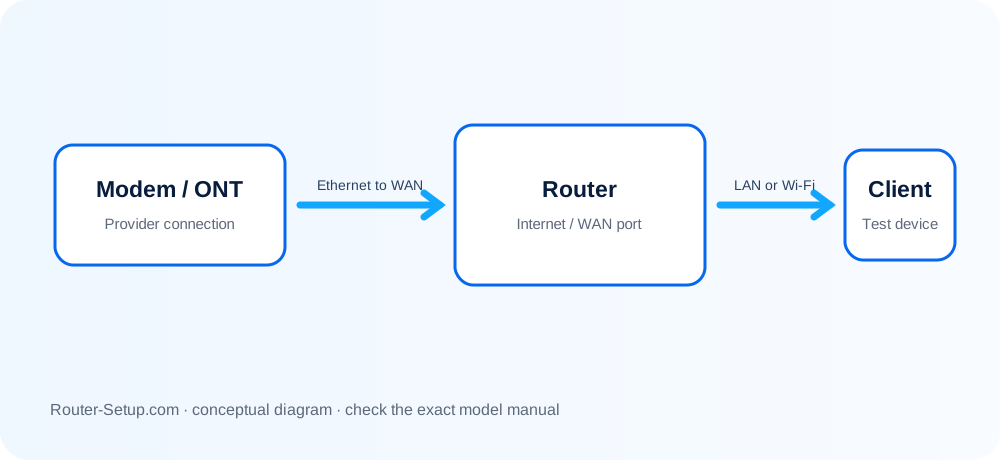
Power off the modem, connect its Ethernet output to the router WAN or Internet port, then power the modem back on. Wait until it is fully online before starting the router.
Open the Setup Page
Connect a phone or computer to the router using Ethernet or the default Wi-Fi. Open the manufacturer app or enter the local router address in a browser.
Configure Wi-Fi and Security
Choose a unique network name, create a long password, enable WPA2 or WPA3, install any available firmware update and change the administrator password.
Test the Connection
Test wired and wireless devices, confirm both frequency bands work and check signal quality in the rooms where you normally connect.
Install a new router from cable check to final test
A first installation succeeds when the modem hand-off, WAN settings and local Wi-Fi are verified separately. This sequence starts before cables are removed and ends only after wired and wireless clients both pass testing.
Photograph the modem and old-router cables before disconnecting anything
Photograph the modem and old-router cables before disconnecting anything. Record the ISP name and whether the old router uses PPPoE, a VLAN ID, a static WAN address or a modem-only Dynamic IP connection.
Place the new router in an open central position
Place the new router in an open central position. Attach removable antennas while power is off. Do not place it inside a cabinet or directly beside a cordless-phone base.
Turn off the modem or fibre ONT and remove its backup battery if the provider permits
Turn off the modem or fibre ONT and remove its backup battery if the provider permits. Disconnect the old router.
Connect the modem or ONT Ethernet port to the new router port marked Internet or WAN
Connect the modem or ONT Ethernet port to the new router port marked Internet or WAN. Connect a computer to a LAN port when browser setup is available.
Start the modem or ONT first
Start the modem or ONT first. Wait until its online/service indicator is stable; this can take several minutes. Then start the router and wait for its ready state.
Join the factory Wi-Fi printed on the router label or use Ethernet
Join the factory Wi-Fi printed on the router label or use Ethernet. Open the manufacturer app or the local gateway shown in the device network details.
Create a unique router administrator password
Create a unique router administrator password. This is not the Wi-Fi password. Save it in a password manager and complete any recovery questions.
Choose the ISP connection type
Choose the ISP connection type. Use Automatic/Dynamic IP unless the ISP supplied PPPoE credentials, static details or VLAN instructions. Do not guess these values.
Set a new Wi-Fi name and a long unique passphrase
Set a new Wi-Fi name and a long unique passphrase. Select WPA2/WPA3 mixed mode if older devices need compatibility; avoid WEP and open security.
Install only firmware offered for the exact model, region and hardware revision
Install only firmware offered for the exact model, region and hardware revision. Keep the router powered until it fully restarts.
Reconnect devices in small groups
Reconnect devices in small groups. Test one phone, one computer and one wired device before changing advanced settings.
Verify the result: the router has a non-zero WAN IP, two independent devices browse successfully, DNS works, and the speed near the router is reasonable for the Internet plan
Verify the result: the router has a non-zero WAN IP, two independent devices browse successfully, DNS works, and the speed near the router is reasonable for the Internet plan.
Confirm the result
- The Internet/WAN page contains a valid provider address—not blank or 0.0.0.0.
- A wired computer and a wireless phone can each open multiple websites.
- The administrator password, Wi-Fi password and ISP details have been stored separately.
Questions before and after first-time router setup
Can I set up a router without an app?
Usually yes. Most routers provide a browser-based admin page accessible through a local IP address.
Should the modem or router start first?
Start the modem first, wait until it is online, then power the router.
What security mode should I use?
Use WPA3 when all devices support it, or WPA2/WPA3 transition mode for compatibility.
Why does setup fail after replacing an old router?
The modem can retain the previous router lease, or the new router may be missing PPPoE or VLAN details. Restart upstream equipment in order and compare the ISP settings.
Build the rest of your home network
Browse setup, troubleshooting, security and buying guides for every major router type.
Browse all guides