Firmware updates can close security vulnerabilities, improve stability and add compatibility. Use the router update feature and avoid interrupting power.
Record Current Settings
Back up the configuration if the router provides an export option and note custom internet, DNS and port-forwarding settings.
Check the Exact Model
Model names and hardware revisions matter. Firmware for a similar-looking device can be incompatible.
Use the Built-In Updater
Prefer the router app or admin-page update tool. It selects firmware intended for the detected device.
Keep Power Connected
Do not unplug, reboot or press reset while the update is installing. A wired admin connection is preferable.
Verify After Restart
Confirm the firmware version, test internet and Wi-Fi, and review settings that might have changed.
Upgrade router software and prove the network still works
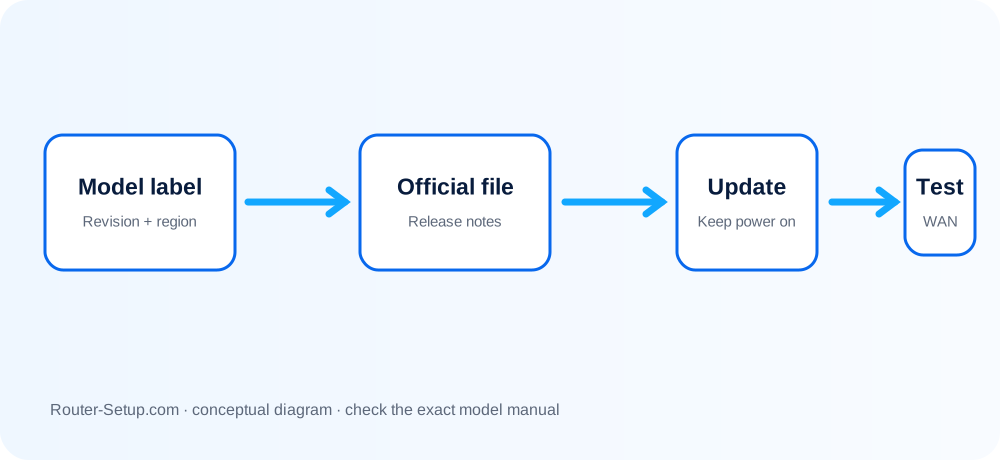
Firmware is model-, revision- and sometimes region-specific. This workflow validates the file before installation and tests the functions most likely to regress after reboot.
Read the exact model, hardware revision and region from the product label
Read the exact model, hardware revision and region from the product label. Similar model names can use incompatible firmware.
Back up the router configuration and photograph important WAN, VLAN, port-forwarding and reservation settings
Back up the router configuration and photograph important WAN, VLAN, port-forwarding and reservation settings.
Use Ethernet when possible
Use Ethernet when possible. Disconnect unnecessary USB storage and make sure power is stable.
Check the router’s built-in update page first
Check the router’s built-in update page first. If downloading manually, use only the manufacturer support page for that exact model and revision.
Read the release notes and extract the downloaded archive when the vendor supplies a ZIP file
Read the release notes and extract the downloaded archive when the vendor supplies a ZIP file. Select the firmware image—not a text or checksum file.
Start the update once
Start the update once. Do not refresh the page, close the app, unplug cables or press Reset while installation is active.
Wait for the router to reboot and for the Internet/Wi-Fi indicators to stabilise
Wait for the router to reboot and for the Internet/Wi-Fi indicators to stabilise. Reconnect manually if the client retained the old session.
Sign in again and confirm the displayed firmware version matches the intended release
Sign in again and confirm the displayed firmware version matches the intended release.
Test WAN access, both Wi-Fi bands, Ethernet, mesh satellites and any critical VPN or port-forward rule
Test WAN access, both Wi-Fi bands, Ethernet, mesh satellites and any critical VPN or port-forward rule.
Restore a saved configuration only to the same model and compatible firmware
Restore a saved configuration only to the same model and compatible firmware. If faults begin after the update, consult the release notes before resetting.
Confirm the result
- The administration page displays the intended new firmware version.
- WAN, both Wi-Fi bands and critical wired ports work after reboot.
- Mesh nodes, VPN rules or forwards used by the household have been retested.
Firmware files, interruptions and post-update recovery
How long does an update take?
Often five to fifteen minutes, including the automatic restart.
Will firmware erase my settings?
Usually not, but a backup is advisable.
Should I install beta firmware?
Use stable releases unless you understand the risks and need a specific beta fix.
Why should I read the release notes first?
They identify fixed faults, changed features, prerequisites and known issues that determine whether the update is relevant to your router.
Keep the router supportable
Browse setup, troubleshooting, security and buying guides for every major router type.
Browse all guides