Quick answer: “Connected” only proves your device joined the local Wi-Fi. Internet also requires a working modem/ONT, a WAN address, correct ISP settings and DNS. Test those layers separately.
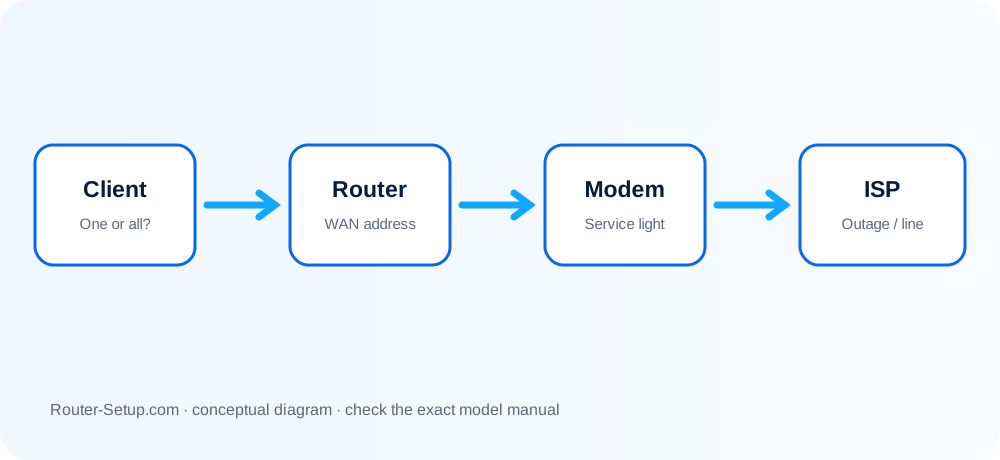
Locate the break between Wi-Fi and the ISP
| Test result | Failing layer |
|---|---|
| One device fails | Suspect that device, VPN, private DNS or saved network settings. |
| Every device fails | Check router WAN, modem/ONT and ISP status. |
| Ethernet works, Wi-Fi fails | Internet is up; focus on wireless bands, security or client compatibility. |
| New router has no Internet | The modem may retain the old router’s MAC lease, or the ISP requires PPPoE/VLAN settings. |
Test client, router WAN and modem in sequence
Test two different devices and, if possible, one wired connection.
Look at the modem/ONT indicators. If its service light is abnormal, check the ISP before resetting the router.
Connect a computer directly to the modem only if your ISP/equipment permits it, then restore the router connection afterward.
Log into the router and inspect the WAN/Internet IP. A blank or 0.0.0.0 address means the router has not obtained service.
Restart in order: power off both, start modem/ONT and wait until fully online, then start the router.
For a replacement router, allow the modem to forget the old device lease; some services require an extended power-down or ISP release.
Verify Dynamic IP versus PPPoE, VLAN ID and cloned MAC only against ISP information. Then test DNS with VPN/private DNS temporarily disabled.
Changes to avoid until the failed layer is known
- Do not factory-reset before recording PPPoE, VLAN, static IP and Wi-Fi settings.
- Do not change many variables at once; retest after each layer.
- Do not publish or share your public IP, admin password or Wi-Fi key when seeking help.
Safety: Do not disclose public IP, PPPoE credentials or router passwords while testing the WAN path.
Connected-without-Internet questions
Why does Wi-Fi say connected with no Internet?
Your device has a local link to the router, but the router may lack an upstream WAN connection or usable DNS.
Should I press Reset?
Not first. Check the modem, WAN address and ISP settings; a reset can erase information needed to reconnect.
Why did the old router work but the new one does not?
The modem or ISP may still associate service with the old router, or the new router lacks required PPPoE/VLAN settings.